


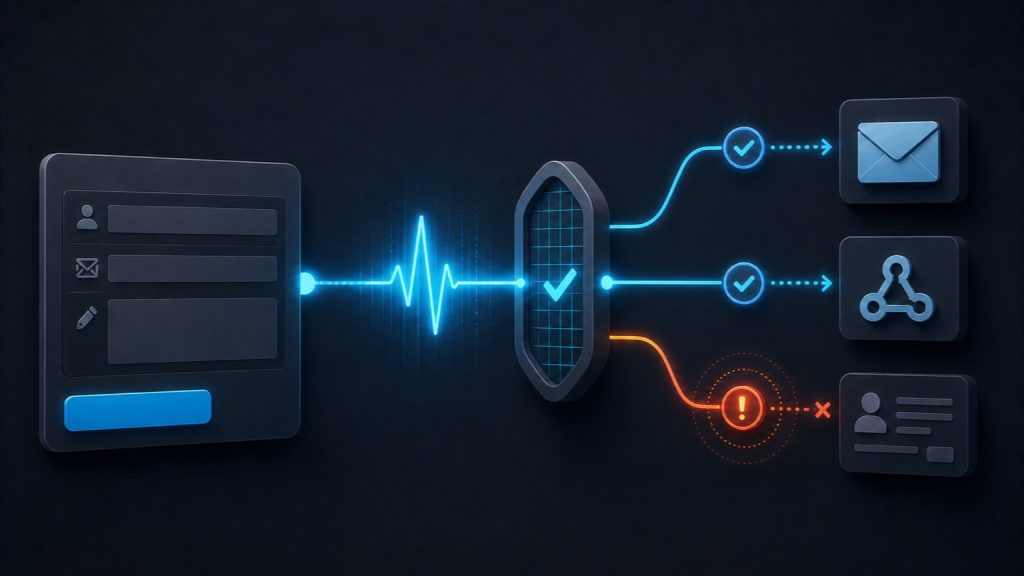
A WordPress contact form can look healthy while the lead goes nowhere.
The page loads. The fields accept input. The visitor clicks Submit. A green success message appears. Meanwhile, the notification email never arrives, the webhook gets a 401, or the CRM record is missing.
That is why I do not treat a successful click as a successful form. I treat the form as a chain. WordPress contact form monitoring has to test the chain through the last destination the business depends on.
The short version
| What to monitor | What it proves | What it does not prove |
|---|---|---|
| Page and fields render | A browser can reach the live form and interact with its controls. | The form can submit or deliver anything. |
| Submission returns success | The front end received a response it considers successful. | An entry, email, webhook, or CRM record exists. |
| WordPress entry exists | The form backend retained the submission. | The notification or external integration worked. |
| Notification reaches a test inbox | The form-to-mailbox path completed. | The CRM or webhook received the same data. |
| CRM or webhook contains the canary ID | The downstream handoff completed for that test. | Every field and every production submission is correct. |
The practical setup is simple: submit a scheduled canary through the real public form, give it a unique ID, and verify that ID at the far side. Alert when the expected result does not appear by its deadline.
What WordPress contact form monitoring actually means
Uptime monitoring asks whether a URL responds. Form monitoring asks whether a business action completes.
For a simple contact form, the business action may be “a notification reaches the sales inbox.” For a lead form, it may be “a contact appears in the CRM with the correct source fields.” For an application form, it may include file storage, confirmation email, and a record in an internal system.
Write that expected outcome before choosing a monitoring tool. Otherwise, it is easy to buy a monitor that checks the page and stops before the failure you care about.
A success message proves only one layer
A success message can be accurate from the browser’s point of view. The form endpoint accepted the request and returned the expected response. The next action can still fail.
WordPress makes this distinction explicit for email. Its official wp_mail() documentation says a true return value means the method processed the request without an error. It does not automatically mean the recipient received the email. Checked 2026-08-29.
The same reasoning applies to a webhook. A form plugin may queue the handoff after it has already told the browser “success.” If the API key has expired or the destination returns an error, the visitor cannot see that later failure unless the implementation was built to surface it.
The form chain I monitor
I break the path into checkpoints:
page renders
→ fields accept input
→ submission request succeeds
→ WordPress stores the entry
→ notification reaches its inbox
→ webhook or CRM receives the record
Not every site uses every checkpoint. Some forms do not store entries. Some send only to a CRM. The rule is to verify the last system that creates business value, not the easiest response to inspect.
Seven ways a form can fail quietly
| Failure mode | What the visitor may see | What the monitor should inspect |
|---|---|---|
| SMTP authentication or mail routing failure | Normal success message | Receipt in a dedicated test inbox, not only the local send result |
| Plugin, theme, or PHP change breaks a hook | Success, error, or a frozen form | Real browser submission plus the downstream record |
| CRM token or API key expires | Normal success message | CRM record with the unique canary ID |
| Webhook returns 4xx or 5xx | Often normal success message | Webhook response and retry/dead-letter log |
| Spam filtering diverts a real notification | Normal success message | Inbox, spam folder, bounce event, and mail-provider log |
| Cache serves stale form markup or a stale nonce | Form renders but submission fails or behaves inconsistently | Fresh external browser session through the public cached page |
| JavaScript error blocks validation or submission | Submit button appears to do nothing | Browser console, network log, screenshot, and failed assertion |
The mechanisms matter more than blaming a plugin. A form builder can be configured correctly and still sit inside a broken mail, cache, JavaScript, or API path.
Build one canary submission you can recognize
A canary is a synthetic submission created only to prove the path still works. Make it boring and easy to find.
- Use a dedicated test email address.
- Create a unique ID for every run, such as
form-canary-20260829-1500. - Use stable values that pass validation without resembling a real prospect.
- Add
monitoring_canary=1as a hidden field where the form supports it. - Keep the ID in the subject, stored entry, webhook payload, and CRM record when possible.
- Define how test entries will be filtered, retained, or deleted.
Do not reuse the same ID forever. A stale CRM record from last week can make a broken test look healthy today.
Assert on the far side
The strongest assertion is usually outside WordPress.
- If email is the outcome, search the monitoring inbox for the current canary ID.
- If a webhook is the outcome, require a non-2xx response to fail the test and store the response body safely.
- If a CRM is the outcome, query for the current canary ID and verify the required fields.
- If a WordPress entry is the outcome, confirm the new entry exists and contains the expected values.
Keep the alert channel independent from the path being monitored when practical. If the form’s email is broken, an alert sent through that same WordPress mail route can disappear with it.
What should trigger an alert?
I would start with deterministic failures:
- The scheduled canary did not run by its deadline.
- The page, selector, submission, or success assertion failed.
- The expected email, entry, webhook, or CRM record did not appear within the allowed delay.
- The webhook returned a non-2xx response.
- The test record arrived but a required field was empty or changed.
Volume alerts need more care. “Zero submissions in 12 hours” may be urgent on a high-volume lead site and completely normal on a small B2B site over a weekend. Build the floor from the site’s normal business-hour pattern. Do not copy somebody else’s threshold.
Set the canary frequency from the maximum blind window the business can tolerate. If waiting an hour to discover a broken campaign form is unacceptable, an hourly test is already too slow. Include the normal delay of the destination too. A CRM sync that usually completes in three minutes should not fail an assertion after ten seconds.
I also separate a failed test from a broken monitor. Record a heartbeat for the scheduler itself, plus the start time and finish time of every canary. If no run starts, investigate the scheduler. If the run starts but the browser fails, investigate the page. If the browser passes but the destination assertion expires, investigate the downstream path. Those are different incidents.
Use consecutive-failure logic only when a brief retry is acceptable. A temporary network timeout may deserve one quick retry. An authentication error, repeated webhook rejection, or missing business-critical record may deserve an immediate page. Write that policy before the first alert so the monitor does not become a machine for inventing urgency.
Option 1: WP-Cron, a small POST template, and a log
The smallest local version runs inside WordPress. A scheduled hook sends a test request to the form’s documented server-side submission endpoint and writes the result to the PHP error log or a dedicated log sink.
WordPress documents wp_remote_post() as an HTTP POST function that returns a response array or WP_Error. WordPress also recommends checking wp_next_scheduled() before scheduling a recurring hook so the event is not duplicated. Checked 2026-08-29.
A starting template
This is a template, not a universal copy-and-paste form submission. Replace the endpoint and body with the documented server-side method for your form. If the real flow needs JavaScript, cookies, a dynamic nonce, or CAPTCHA, use the browser method in the next section.
<?php
/**
 * Install as a tiny custom plugin.
 * Replace the endpoint, field names, and test destination.
 */

const HS_FORM_CANARY_ENDPOINT = 'https://example.com/replace-with-real-endpoint';

add_action( 'init', 'hs_schedule_form_canary' );
function hs_schedule_form_canary() {
    if ( ! wp_next_scheduled( 'hs_run_form_canary' ) ) {
        wp_schedule_event( time() + 300, 'hourly', 'hs_run_form_canary' );
    }
}

add_action( 'hs_run_form_canary', 'hs_run_form_canary' );
function hs_run_form_canary() {
    $canary_id = 'form-canary-' . gmdate( 'Ymd-His' );

    $response = wp_remote_post(
        HS_FORM_CANARY_ENDPOINT,
        array(
            'timeout' => 20,
            'body'    => array(
                'name'               => 'Form Monitor',
                'email'              => 'form-canary@example.com',
                'message'            => 'Synthetic test ' . $canary_id,
                'monitoring_canary'  => '1',
                'monitoring_test_id' => $canary_id,
            ),
        )
    );

    if ( is_wp_error( $response ) ) {
        error_log( '[form-canary] ' . $canary_id . ' request_error=' . $response->get_error_message() );
        return;
    }

    $status = wp_remote_retrieve_response_code( $response );
    error_log( '[form-canary] ' . $canary_id . ' http_status=' . $status );
}

register_deactivation_hook( __FILE__, 'hs_clear_form_canary' );
function hs_clear_form_canary() {
    wp_clear_scheduled_hook( 'hs_run_form_canary' );
}
Do not log form secrets or real lead payloads. Log the test ID, time, response code, and a sanitized error. Then use a separate process to confirm the current test ID reached the inbox, entry store, webhook, or CRM.
The limit of WP-Cron monitoring
WP-Cron is not a precise external scheduler. WordPress says it checks due tasks on page load and does not run continuously like system cron. A task scheduled for 2:00 PM may run later if no page loads occur until later. Checked 2026-08-29: WordPress Cron handbook.
That creates a serious blind spot: a broken or idle WordPress site is being asked to monitor itself. For a business-critical form, trigger WP-Cron from a real system scheduler or keep the monitor outside the WordPress stack. WordPress publishes an official guide for calling WP-Cron from a system task scheduler. Checked 2026-08-29.
You can inspect local cron state with WP-CLI commands such as wp cron event list and manually run a named event. WordPress documents those commands in its WP-Cron testing guide, checked 2026-08-29.
Option 2: an external browser check through the real form
This is the stronger general-purpose method. A browser opens the public page, fills the real fields, clicks the real button, and checks the visible result. It catches JavaScript failures, stale markup, missing controls, client-side validation problems, and many cache-related issues that a server-side POST will miss.
Checkly documents browser checks that run in real Chromium or Chrome sessions using Playwright. Its published flow includes navigation, typing, form submission, assertions, screenshots, videos, logs, and alerts when assertions fail. Checked 2026-08-29: Checkly browser-check documentation.
A browser-check skeleton
import { test, expect } from '@playwright/test';

test('WordPress contact form canary', async ({ page }) => {
  const canaryId = `form-canary-${Date.now()}`;

  await page.goto('https://example.com/contact/');
  await page.getByLabel('Name').fill('Form Monitor');
  await page.getByLabel('Email').fill('form-canary@example.com');
  await page.getByLabel('Message').fill(`Synthetic test ${canaryId}`);
  await page.getByRole('button', { name: 'Submit' }).click();

  await expect(page.getByText('Thank you')).toBeVisible();

  // Add a second assertion outside the browser:
  // confirm canaryId exists in the inbox, entry store, webhook, or CRM.
});
Use stable labels or dedicated test selectors when possible. A cosmetic button-text change should not wake somebody at 2:00 AM if the form still works.
Do not disable CAPTCHA or spam protection for every visitor just to make the monitor pass. Use a narrowly scoped test route, authenticated test traffic, or a vendor-supported test mode. Then run a separate manual check that confirms the normal protection still works.
Option 3: a purpose-built WordPress monitoring service
A purpose-built service can remove most of the scheduling, browser automation, inbox matching, and cleanup work. I would evaluate it on the exact proof it returns, not on the number of form plugins in its feature list.
For example, FormStatus says its companion plugin tests from page load and submission through notification-email receipt, runs daily, and can retest after plugin or theme updates. It requires a FormStatus account. Checked 2026-08-29: FormStatus on WordPress.org.
CheckView says it runs scheduled real-browser tests, can verify email notifications and stored entries, and supports custom test flows. Automated testing requires a connected CheckView account. Its WordPress.org description also says test data is purged after each run. Checked 2026-08-29: CheckView on WordPress.org.
Those are vendor-published capabilities, not my independent product test. Confirm support for your form, CAPTCHA, multi-step behavior, mailbox, CRM, privacy requirements, and cleanup rules before relying on either service.
Compare the three implementation paths
| Approach | Best proof | Main blind spot | Operational burden |
|---|---|---|---|
| WP-Cron + POST + log | Server-side endpoint and local scheduling | Does not reproduce a real browser; WordPress monitors itself | You own code, scheduling, logs, far-side assertion, and alerts |
| External Playwright/browser monitor | Public page, JavaScript, real controls, and submission response | Still needs a separate inbox, entry, webhook, or CRM assertion | You own selectors, test data, downstream check, and cleanup |
| Purpose-built WordPress service | Packaged browser, notification, entry, and alert checks where supported | Coverage depends on the form, integrations, and service design | Lower code burden; still requires configuration and periodic review |
This is not a ranking. Choose the smallest approach that reaches the destination you actually need to prove.
Keep synthetic submissions out of production reporting
A monitoring system can create its own mess if every hourly test becomes a lead, conversion, autoresponder, sales task, and ad-platform event.
- Mark every test with a dedicated canary field and email domain.
- Exclude canaries from lead scoring, notifications to sales, and conversion uploads.
- Prevent autoresponders from sending to uncontrolled addresses.
- Delete or archive test records on a defined schedule.
- Keep one audit trail long enough to investigate failures.
- Make sure filtering happens after the assertions you need, not before them.
If attribution is part of the form payload, include plain test values and verify they survive the submission. My guide to debugging blank UTM fields uses the same checkpoint method: find the last place where the value is still present. A broader 30-minute WordPress attribution audit is useful when the failure reaches beyond one form.
Keep the canary payload minimal. Do not put real names, customer emails, phone numbers, or sensitive files into a repeating test. Use a controlled mailbox and clearly synthetic content. If a destination cannot exclude test records safely, decide whether a lower-frequency test, a dedicated test form, or a different assertion is the better trade.
Cleanup needs its own verification. A job that deletes canaries can fail just as quietly as the form. Track the age and count of synthetic records. Alert when old canaries remain past the retention window. Never let cleanup remove real leads because a production record accidentally matched a broad email-domain or subject-line filter.
Finally, document the canary where the next operator will find it. Record the form URL, selectors, field mapping, test identity, destination query, alert owner, cleanup rule, and the safe way to pause the test. Monitoring that only one person understands becomes another fragile dependency.
What to do in the first ten minutes after an alert
Minutes 0 to 2: prove the alert is real
Run the canary once from a clean browser. Confirm the public page is the production page, not a staging URL or uncached admin session. Check whether the monitor failed before submit, at submit, or after submit.
Minutes 2 to 5: find the last healthy checkpoint
- Did the page render without a console error?
- Did the network request leave the browser?
- What HTTP response came back?
- Was a WordPress entry stored?
- Did the mail provider accept the message?
- Did the webhook or CRM return an error?
Stop debugging upstream once you find the last good layer. If the entry is correct but the CRM is empty, rebuilding the form will add noise.
Minutes 5 to 8: check what changed
Review recent plugin, theme, PHP, cache, firewall, SMTP, DNS, and credential changes. Compare the alert time with deployment and update logs. If the failure appears only through the public cached page, use the checks in my guide to WordPress host and cache interference to separate cached markup from backend behavior.
Minutes 8 to 10: protect the intake path
If the form is business-critical and the fix is not immediate, route visitors to a tested fallback, display a direct contact method, or pause traffic that depends on the broken path. Make the smallest reversible change. Then rerun the same canary and verify the far-side record before closing the incident.
Form monitoring is not form selection
This post is deliberately not another “best form plugin” list. If you are choosing a builder and care about hidden fields, caching tolerance, and lead-data quality, use my separate WordPress contact form plugin audit. Once the form is chosen, monitoring answers a different question: does the live production path still work today?
What I would not over-claim
- A green success message does not prove delivery.
wp_mail()returning true does not prove inbox receipt.- An HTTP 200 does not prove the response body or business outcome is correct.
- A server-side POST does not prove the public JavaScript form works.
- One canary does not prove every conditional path, upload, device, locale, or field mapping.
- A daily test can leave a form broken for most of a day.
- A monitor can detect a failure. It cannot guarantee that no lead will ever be lost.
- A vendor’s published feature list is not the same as an independent test on your site.
WordPress form monitoring checklist
- Name the last destination the form must reach.
- Create a dedicated canary identity and unique ID format.
- Submit through the real public form whenever possible.
- Assert the front-end response and the far-side outcome.
- Use an alert path independent from the failing route.
- Set a deadline for each expected result.
- Add site-specific volume alerts only after establishing a baseline.
- Filter synthetic records from sales, analytics, and ad conversions.
- Retain enough test history to debug failures.
- Test after plugin, theme, PHP, cache, firewall, SMTP, and integration changes.
- Run one failure drill so the team knows where the logs and fallback path are.
- Review the monitor when the form markup or downstream systems change.
My bottom line
A contact form is not healthy because it is visible. It is healthy when a known submission reaches the system that has to act on it.
Build one recognizable canary. Send it through the production path. Check the destination. Alert on the missing result. That is the difference between checking a form and monitoring it.