First-Touch vs Last-Touch Attribution in WordPress
Most attribution debates start in the wrong place.
People want to argue about which channel deserves credit. Paid search? Organic? Email? Referral? Retargeting?
That argument is useful later. But on WordPress, the first question is much more basic:
Did you even capture both sides of the story?
If your form only sends the latest utm_source to your CRM, you are not doing attribution. You are taking a snapshot at the end and pretending it explains the beginning.
If your form only stores the original source, you have the opposite problem. You know what first introduced the visitor, but you may miss the campaign, page, or referrer that brought them back when they finally converted.
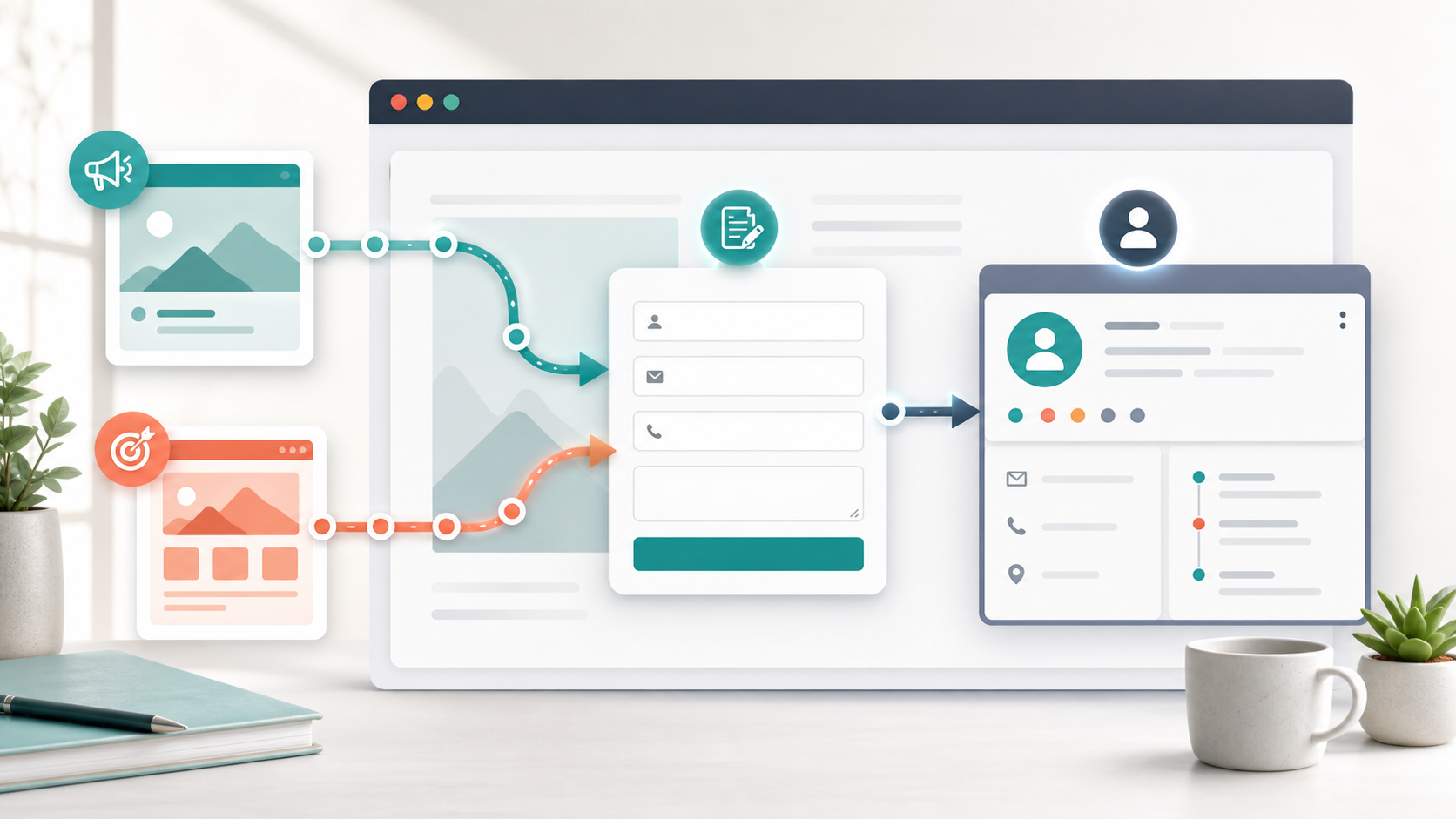
That is why I do not like treating first-touch vs last-touch attribution as a philosophical fight. In a real WordPress lead tracking setup, I want both.
First touch tells me where the relationship started.
Last touch tells me what happened closest to conversion.
The gap between those two is where a lot of marketing truth lives.
What first-touch attribution means in WordPress
First-touch attribution is the first marketing context attached to a visitor.
In the HandL UTM Grabber docs, first-touch parameters are captured when a user first visits the website. They are stored separately, using the first_ prefix, and they are not overwritten on later visits.
That matters.
If someone lands on your WordPress site from a LinkedIn ad today, then comes back next week from Google organic and fills out a form, the original LinkedIn campaign should not disappear just because the final session came from somewhere else.
The first-touch fields I care about most are:
| What I want to know | Field examples |
|---|---|
| Original campaign source | first_utm_source |
| Original campaign medium | first_utm_medium |
| Original campaign name | first_utm_campaign |
| Original paid keyword or term | first_utm_term |
| Original creative or content value | first_utm_content |
| Original referrer | handl_original_ref |
| First landing page | handl_landing_page |
| First landing page domain | handl_landing_page_base |
That last pair is underrated.
Sometimes the most useful first-touch data is not just "Google" or "Facebook." It is the exact first page that did the work. Was it a blog post? A pricing page? A landing page? A comparison page? A webinar page?
That is the kind of detail a founder, CMO, or operator can actually use.
What last-touch attribution means in WordPress
Last-touch attribution is the most recent marketing context before the conversion.
In HandL UTM Grabber, the normal UTM shortcodes like utm_source, utm_medium, and utm_campaign represent last-touch values. When new UTM values appear on a later visit, those last-touch values can update.
The docs describe this plainly: if you change the values in the URL and refresh, the new values show in the standard fields, while the old values remain in the first_utm fields.
That is exactly the behavior I want.
The last-touch fields I normally want in a WordPress form are:
| What I want to know | Field examples |
|---|---|
| Latest campaign source | utm_source |
| Latest campaign medium | utm_medium |
| Latest campaign name | utm_campaign |
| Latest term or keyword | utm_term |
| Latest creative or content value | utm_content |
| Latest Google Ads click ID | gclid |
| Latest Facebook click ID | fbclid |
| Latest Microsoft Ads click ID | msclkid |
| Last-touch referrer | handl_ref |
| Conversion page URL | handl_url |
| Last-touch traffic type | traffic_source |
This is the data that tells me what was happening at the moment the person converted.
Maybe the first touch was a paid social campaign, but the last touch was a branded Google search. Maybe the first touch was organic, but the last touch was an email campaign. Maybe the visitor first found you through a blog post, but converted after a retargeting click.
If you only store one touch, you flatten all of that into one answer.
And one answer is usually not enough.
A simple example
Here is the kind of path I see all the time.
Day 1:
Someone clicks a LinkedIn ad and lands here:
example.com/demo?utm_source=linkedin&utm_medium=paid_social&utm_campaign=founder_demo
They read the page, poke around, and leave.
Day 6:
They search the brand name on Google, return to the site, visit two more pages, and fill out a form.
If you are only using last-touch attribution, the lead may look like Google organic or branded search.
If you are only using first-touch attribution, the lead may look like LinkedIn paid social.
Both are true, but neither is complete.
The better CRM record would show:
| Attribution question | Answer |
|---|---|
| Where did this person first come from? | LinkedIn paid social |
| Which campaign introduced them? | founder_demo |
| What page did they first land on? | /demo |
| What brought them back before conversion? | Google organic or branded search |
| What page did they convert on? | The page stored in handl_url |
Now you can have a better conversation.
Maybe LinkedIn is doing the expensive introduction work.
Maybe organic search is catching people later when they are already aware.
Maybe the landing page is good at creating interest but not strong enough at forcing action.
That is real attribution thinking.
Why WordPress forms lose this data
The ugly truth is that most WordPress attribution problems are not caused by a lack of data. They are caused by bad handoffs.
The visitor arrives with the UTM data.
The data may get stored in the browser.
But the form never sends it anywhere useful.
That is why I keep coming back to hidden fields. If the lead form, checkout form, booking form, or signup form is the conversion point, then the attribution data needs to be included in that submission.
HandL UTM Grabber is built around this idea. It captures the values when the visitor lands, stores them in the browser, and makes them available later through shortcodes, field wrappers, or automatic field population.
That matters because the form is often not on the first landing page.
The visitor may land on a blog post, move to a product page, read a case study, come back later, and only then fill out a form. By that point, the original UTM parameters are usually gone from the visible URL.
That is not automatically a problem.
The problem is when your form never pulls the stored values into the submission.
WPForms and the first-touch trap
WPForms is a good example of a common implementation detail.
The UTM Grabber WPForms docs note that first attribution parameters may not show up in WPForms smart tags by default. The fix is to add the first attribution parameters as custom parameters. Once added, they show in Smart Tags and can be used like any other parameter.
This is the kind of small setup step that changes the quality of your reporting.
If your WPForms form only includes:
utm_sourceutm_mediumutm_campaign
Then you are mostly capturing last touch.
If you also add:
first_utm_sourcefirst_utm_mediumfirst_utm_campaignfirst_utm_termfirst_utm_contenthandl_original_refhandl_landing_page
Now you have a much stronger lead record.
This is not complicated work, but it does require someone to care enough to add the fields and test them.
That is where many attribution setups fail.
The fields I would send to the CRM
If I were setting this up for a WordPress lead generation site, I would not over-engineer the first version. The same practical logic applies whether you are using Contact Form 7, WPForms, Gravity Forms, a booking tool, or a CRM handoff through something like Zapier for Contact Form 7.
I would start by sending these fields into the CRM:
| CRM field group | Fields |
|---|---|
| First-touch UTMs | first_utm_source, first_utm_medium, first_utm_campaign, first_utm_term, first_utm_content |
| Last-touch UTMs | utm_source, utm_medium, utm_campaign, utm_term, utm_content |
| Click IDs | gclid, fbclid, msclkid |
| First-touch page/referrer | handl_original_ref, handl_landing_page, handl_landing_page_base |
| Last-touch page/referrer | handl_ref, handl_url, handl_url_base |
| Source classification | first_traffic_source, traffic_source |
That may look like a lot of fields, but it is not a lot of complexity.
It is just a clean separation:
- original source
- latest source
- original page context
- latest page context
- click IDs for ad platforms
- traffic classification
Once those values are in the CRM, you can decide how sophisticated you want the reporting to become.
But if you do not capture them at form submission time, you cannot magically rebuild the story later.
When first touch is more useful
First touch is most useful when you are trying to understand acquisition.
I use it for questions like:
- Which campaigns introduce new leads?
- Which content creates the first serious visit?
- Which channels are under-credited by last-click reporting?
- Which paid campaigns start journeys that close later through organic or direct traffic?
This is especially important for longer consideration cycles.
If someone sees your ad, reads your blog, joins your email list, leaves, comes back through branded search, and finally books a call, last-touch reporting can make the top of the funnel look weaker than it is.
That is how good acquisition campaigns get cut too early.
The data does not have to be perfect to be useful. It just has to preserve enough of the original context to stop you from making lazy decisions.
When last touch is more useful
Last touch is most useful when you are trying to understand conversion behavior.
I use it for questions like:
- What brought the visitor back right before conversion?
- Which landing page or page path produced the form fill?
- Which retargeting, email, organic, or branded search activity helped close the loop?
- Which source is most present at the bottom of the funnel?
Last touch is not "wrong."
It is just incomplete when used alone.
For many WordPress businesses, last-touch data is still the easiest way to debug the final conversion path. If leads keep converting from a certain page, I want to know that. If a particular referral source is the last step before form submission, I want to know that too.
The mistake is not using last touch.
The mistake is pretending last touch explains the whole journey.
Where Full Tracking Mode fits
There is a third layer too: full journey tracking.
HandL UTM Grabber’s Full Tracking Mode is designed to capture page visits for each session. The docs say it can collect session ID, timestamp, page URL, referrer URL, and UTM parameters, and store them in WordPress database tables for sessions, UTM sets, and page views.
That is more detailed than first-touch and last-touch fields.
I think about it this way:
- first touch tells me where the journey started
- last touch tells me what happened near conversion
- full tracking tells me more about the path in between
Do you need Full Tracking Mode for every site?
No.
For many lead generation teams, capturing first and last touch into the CRM is already a major upgrade. I wrote about the broader capture-and-store model years ago in WordPress Plugin: Capturing & Tracking UTM and GCLID variables, and the core idea still holds up.
But if you need to inspect session paths, compare page visits, or understand more of the movement across the site, then Full Tracking Mode gives you another layer.
Just remember the practical tradeoff: more tracking detail means more data to manage. The docs also warn that Full Tracking Mode can increase database size, so I would use it intentionally.
How I test first-touch and last-touch tracking
I do not trust attribution setups until I test them like a user.
Here is the simple test I would run:
- Open an incognito window.
- Visit a tagged URL with one set of UTMs, such as
utm_source=linkedin. - Check that the first-touch and last-touch fields both show the LinkedIn values.
- Visit the same site again with a different tagged URL, such as
utm_source=google. - Confirm that the last-touch fields update to Google.
- Confirm that the first-touch fields still show LinkedIn.
- Submit the form.
- Check the CRM, email notification, form entry, or Google Sheet where the lead lands.
The key is step 6.
If the first-touch values get overwritten, the setup is not preserving origin.
If the last-touch values never update, the setup is not capturing the most recent context.
If neither set reaches the CRM, the form handoff is broken.
That last one is the most common.
The common mistakes I see
The first mistake is capturing only utm_source.
That is better than nothing, but barely. Source without medium, campaign, landing page, referrer, and click ID often creates more questions than answers.
The second mistake is treating UTMs as if they only matter on the landing page.
In WordPress, the conversion often happens later. That is the whole reason cookies, shortcodes, wrappers, and hidden fields matter.
The third mistake is letting form field names drift.
If the plugin expects first_utm_source, do not invent first source, original_source, or lead_source_first_touch in the form and assume everything will map itself. Use clean internal names, then map them nicely inside the CRM if needed.
The fourth mistake is relying only on Google Analytics.
GA is useful, but your sales team does not work individual leads from GA reports. They work leads from the CRM. If the CRM record is missing source context, your revenue conversation gets weaker.
The fifth mistake is thinking first-touch vs last-touch is a winner-take-all decision.
It is not.
You do not need to crown a single winner before you store the data.
Store both. Analyze later.
My practical recommendation
My recommendation is simple:
Every serious WordPress lead generation site should capture both first-touch and last-touch attribution in its forms.
Not because attribution will become perfect.
It will not.
Browsers change. Consent rules matter. People switch devices. Some traffic arrives without UTMs. Some journeys are messy because humans are messy.
But capturing both first and last touch gives you a much better operating picture than either one alone.
Use first touch to understand what introduced the lead.
Use last touch to understand what happened closest to conversion.
Use page and referrer fields to see the actual WordPress journey, not just the campaign label.
Use click IDs when paid platforms need offline conversion feedback.
And most importantly, send the data into the system where decisions are actually made.
For many teams, that system is the CRM.
That is why I keep pushing this back to forms. Attribution does not become useful because it exists in a cookie somewhere. It becomes useful when it follows the lead into the tools your team uses every day.
The bottom line
First-touch and last-touch attribution answer different questions.
First touch asks:
"Where did this relationship start?"
Last touch asks:
"What happened right before the conversion?"
If you only capture one, your WordPress reporting will be biased by design.
If you capture both, you still have to interpret the data carefully, but at least you are not throwing away half the story before the lead even reaches your CRM.
That is the real win.
Not perfect attribution.
Better memory.
And in marketing, better memory usually leads to better decisions.