Multi-Step Forms and Lost UTMs: What Usually Goes Wrong

Multi-step forms are where a lot of attribution setups go to look healthy and quietly fail.
The ad click works.
The landing page loads.
The visitor fills out step one, step two, step three, and the thank-you page fires.
Then the lead reaches the CRM with a blank utm_source.
That is the part that frustrates people, because everything visible worked. The form did not crash. The submission did not fail. The sales team still got the lead.
But the attribution disappeared somewhere between the first pageview and the final submit.
In my experience, this is usually not because UTMs are fragile by nature. It is because multi-step forms create more handoff points. More steps means more places where hidden fields can be left behind, renamed, rendered too late, excluded from the final payload, blocked by consent timing, or ignored by the CRM mapping.
That is the whole problem.
This is why I do not debug multi-step form attribution by staring at the final CRM record. By then, the evidence is already gone. I want to know where the value disappeared.
The short version
When someone tells me, "Our multi-step form is losing UTMs," I usually think about one of these failure points first:
| What usually goes wrong | What it looks like |
|---|---|
| The hidden fields are not inside the final form submission | The visible form submits, but the UTM fields never travel with it |
| Field names do not match exactly | utm_source exists in the cookie, but the form field is named utm source, utm-source, or lead_source |
| The form step is rendered too late | The tracking script fills fields on load, but the final step appears later through AJAX or a modal |
| The multi-step builder creates separate form instances | Step one and step three look connected, but the final payload only includes fields from one instance |
| The form is embedded in an iframe or external tool | WordPress has the UTMs, but the embedded form does not receive them |
| Consent or optimization delays tracking | The visitor submits before marketing tracking starts or before scripts run |
| Caching or redirects interfere with the first pageview | The tagged URL arrives, but query strings or scripts get handled badly |
| The CRM mapping ignores hidden fields | The form entry has UTMs, but HubSpot, Salesforce, Zapier, or the webhook does not |
That table is the real article in miniature.
Most multi-step UTM problems are not mystical. They are plumbing problems.
UTMs disappearing from the URL is usually not the problem
The first thing I want to clear up is this:
UTMs do not need to stay visible in the browser address bar for the whole session.
In HandL UTM Grabber, the whole point is to capture attribution when the visitor lands, store it in the browser, and make it available later when the conversion happens. The docs explain the same idea in the article about UTMs disappearing from the URL: once the values are captured into cookies, they can still be accessed later for conversion.
That matters with multi-step forms because the final form submission often happens long after the original URL is gone.
A real visitor might:
- Land on a page with UTMs.
- Read the page.
- Click a CTA.
- Open a multi-step form.
- Move through three or four steps.
- Submit on a final screen that no longer has any UTMs in the URL.
That is normal.
The question is not, "Are UTMs still in the address bar?"
The question is:
Did the values get captured, stored, inserted into the form fields, included in the final submission, and mapped into the system where the lead lives?
That is the path I care about.
1. The hidden fields are not part of the final submission
This is the most common multi-step form mistake.
Someone adds hidden fields to the form and assumes the job is done.
But in a multi-step form, "the form" is not always one clean thing.
Some builders keep every step inside one form instance. Good.
Some builders only submit fields from the active step. Less good.
Some builders create separate sections that look like one form to the user but behave like different form objects under the hood. That is where attribution gets weird.
The Breakdance Form Builder documentation says this plainly for multi-step forms: use the same Form Builder instance and include the hidden fields in that form.
That sounds like a small implementation note.
It is not small.
If the hidden fields sit in a different form instance, a different step container, or a section that never gets submitted, the UTM values can be perfectly captured and still never reach the lead record.
This is why I like checking the actual form submission before I blame attribution.
If the form entry itself does not contain utm_source, the problem is inside the form setup.
If the form entry contains utm_source but the CRM does not, the problem is downstream.
Those are two different problems, and mixing them up wastes time.
2. The field names drift
UTM tracking is not a mind reader.
If the plugin expects utm_campaign, I do not want to see a field named campaign, UTM Campaign, utm-campaign, or lead_campaign_source and then be asked why nothing populated.
HandL UTM Grabber’s no-shortcode implementation is designed to fill fields whose name, id, or class matches the supported parameter names. The docs for hassle-free implementation show the basic idea: fields named or identified as utm_source, utm_medium, utm_term, utm_content, utm_campaign, or gclid can be filled automatically.
That exactness matters.
In the newer Breakdance guide, the docs are even more explicit: field IDs must match exactly, and the troubleshooting section calls out case sensitivity and extra spaces.
The most common naming mistakes I see are:
- using a label instead of the actual field name
- capitalizing values inconsistently, such as
UTM_Source - adding spaces, such as
utm source - using hyphens instead of underscores
- letting the form builder add suffixes to duplicated fields
- naming the CRM property correctly but leaving the form field wrong
- creating first-touch fields without the
first_prefix - adding custom parameters to the campaign URL but not setting them up for capture
This is one of those boring details that decides whether attribution works.
I would rather have ugly internal field names that work than pretty field names that make the CRM look clean while silently losing data.
You can always map utm_source to a nicer CRM label later.
First, capture the value.
3. The hidden fields are prefilled with the wrong thing
Another subtle mistake is manually preloading the hidden field with a placeholder value.
I have seen fields where the value is hardcoded as:
[utm_source]Or:
utm_sourceOr some old test value from the first time the form was built.
That can create confusing results. Sometimes the field never updates. Sometimes the CRM receives the literal shortcode text instead of the resolved value. Sometimes a developer thinks they are helping by setting a default value, but they are actually blocking the normal population flow.
For native integrations, I usually want the hidden field to exist with the right name or ID, and I want the value left empty so the tracking layer can fill it.
If the form builder cannot safely resolve shortcodes inside HTML, use the right wrapper approach instead of forcing shortcodes into places where WordPress will not process them correctly. The Input Field Wrapper documentation exists for exactly this kind of situation.
The rule is simple:
Do not fake the value.
Let the captured value populate the field.
4. The final step appears too late
Multi-step forms often use JavaScript.
That is not a problem by itself.
But it changes the timing.
If the form exists in the page HTML when the page loads, filling the hidden fields is straightforward. If the final step appears later through AJAX, conditional logic, a popup, a slide-in, or a dynamically mounted component, then timing matters.
The Breakdance docs mention this in the troubleshooting section too: for forms loaded through a modal, AJAX, or late in the page, the form needs to be in the DOM long enough before submit because UTM Grabber listens for DOM changes and then fills fields.
In plain English:
If the field does not exist yet, it cannot be filled yet.
This is where some multi-step forms fail in a very specific way.
The visitor moves quickly. The final step appears. The form submits immediately. The hidden fields technically exist, but not long enough for the tracking script to populate them.
Or the fields are generated only after the final "Next" click.
Or the form rebuilds the DOM between steps and wipes out previously filled values.
That is why I like testing slowly and then testing like a real impatient user.
First, move step by step and inspect the hidden fields.
Then submit quickly and see whether the values still survive.
Both tests matter.
5. The form is embedded somewhere else
Embedded forms are another common place where UTMs get lost.
This includes:
- iframes
- third-party form scripts
- scheduling widgets
- quiz builders
- popup tools
- external landing page builders
- form tools that render outside the normal WordPress page
The key question is:
Where does the final form actually live?
If the visitor is on your WordPress site, HandL UTM Grabber can capture the values there. But if the form itself lives inside an iframe or external embed, that embedded form may not automatically see the same cookies or URL parameters.
In that case, the job changes from "populate a hidden field on this page" to "pass the captured values into the embedded experience."
HandL’s docs include a few ways this can happen.
For iframe-based flows, the iframe append documentation shows the utm-src class approach for appending UTMs to an iframe source.
For some external form tools, the setup is more tool-specific. For example, the Fillout form documentation talks about registering URL parameters, creating hidden fields, setting default values, and adjusting the embed.
The practical point is this:
Do not assume an embedded form has the same attribution context as the WordPress page around it.
Prove it.
6. Consent timing changes the flow
Consent-aware tracking is another place where people get surprised.
If your site is configured to wait for consent before storing marketing attribution, then UTM values will not be available until the right consent signal happens.
That may be exactly what you want.
But it changes the testing path.
If a visitor lands with UTMs, ignores the banner, opens a form, and submits before giving marketing consent, you should not expect the same result as a visitor who accepts consent first and then submits.
That is not a multi-step form bug. That is the consent rule doing what it was configured to do.
The mistake is when nobody tests the full consent path.
I want to know:
- What happens before consent?
- What happens after marketing consent is accepted?
- Does tracking start immediately after consent, or only after a page refresh?
- If the user rejects or revokes consent, are tracking cookies removed?
- Are multiple consent integrations enabled at the same time and fighting each other?
For multi-step forms, timing matters even more because the visitor may give consent, open the form, move through steps, and submit without another page load.
If the consent handoff only works after a refresh, the form may still miss the values.
That is the kind of issue that looks like "lost UTMs" in the CRM but is really a consent timing problem.
7. Caching and optimization interfere before the form ever matters
Sometimes the form is innocent.
The problem happened earlier.
A redirect stripped the query string.
A cache layer served a version of the page that did not behave correctly.
A performance plugin delayed the tracking script too aggressively.
A security plugin or hosting layer interfered with query strings or cookies.
The common troubleshooting docs recommend checking request headers in the browser network panel to understand whether caching is coming from the server, CDN, or WordPress plugin layer. That is the right instinct.
Do not guess.
Check the actual request.
With multi-step forms, caching issues are especially annoying because the final symptom is downstream. The lead record is blank, but the root cause may have happened on the first page request.
That is why I like testing from the landing URL forward.
Start where the UTM first enters the site.
Do not start at the thank-you page.
8. The CRM mapping ignores the hidden fields
This one hurts because the WordPress setup can be working perfectly.
The hidden fields populate.
The form entry contains the UTM values.
Then Zapier, HubSpot, Salesforce, GoHighLevel, an email notification, or a custom webhook quietly drops them.
That is not a capture problem.
That is a mapping problem.
The Contact Form 7 documentation is a good example of the full handoff. It is not enough to add the hidden fields. The docs also show adding the corresponding mail tags and using Zapier or other integrations to pass form submissions into downstream systems.
I see this mistake often with multi-step forms because teams test only the visible fields.
Name arrived.
Email arrived.
Phone arrived.
Message arrived.
So they assume the integration is good.
But hidden fields are often excluded from custom notifications, selected-field webhook payloads, or CRM mappings unless someone explicitly adds them.
My rule is:
Always check the native form entry before the CRM.
If the native entry has the UTMs, the form did its job.
If the CRM does not have them, fix the integration.
9. First-touch and last-touch fields get confused
This is not always a technical failure. Sometimes it is an expectation failure.
HandL UTM Grabber can capture last-touch values such as utm_source, utm_medium, and utm_campaign. It can also capture first-touch values with the first_ prefix, such as first_utm_source and first_utm_campaign.
Those are different fields for a reason.
If a visitor first arrives from LinkedIn, later returns from Google, and then submits a multi-step form, the latest utm_source may not match the original first_utm_source.
That does not mean the setup lost the first source.
It means you need to know which field you are looking at.
The WPForms first-attribution docs are a useful reminder here: first attribution parameters may need to be added as custom parameters before they show up in smart tags.
For multi-step forms, I usually want the team to decide this before implementation:
- Are we capturing last touch only?
- Are we capturing first touch only?
- Are we capturing both?
- Are both sets mapped into the CRM?
- Are reports using the right fields?
My answer for serious lead generation is usually: capture both.
You do not have to analyze both every day.
But if you fail to collect one of them, you cannot recover it later.
How I debug a multi-step form that is losing UTMs
I like boring tests.
They work.
Here is the sequence I would use.
1. Start with a clean test URL
Use an incognito window and visit a URL like this:
https://example.com/demo/?utm_source=google&utm_medium=cpc&utm_campaign=multistep-test&utm_term=test-keyword&utm_content=test-ad&gclid=test123Do not reuse an old browser session with old cookies.
Start clean.
2. Confirm the values were captured before touching the form
Before blaming the form, confirm the tracking layer has the values.
Depending on the setup, that may mean checking cookies, checking the populated hidden fields, or using the tool’s expected front-end behavior.
The point is simple:
If values were never captured, the form cannot submit them.
3. Move through the form one step at a time
At each step, inspect whether the hidden fields exist and whether values remain populated.
I especially care about:
- the first step
- the step where hidden fields are added
- the final step
- the moment immediately before submit
If the fields disappear between steps, the builder is probably rebuilding the form or excluding fields.
4. Submit and check the native form entry
Do not jump straight to the CRM.
Check the form’s own submission record first.
If the UTM values are missing there, fix the form.
If they are present there, move downstream.
5. Check the CRM, webhook, Zapier step, or email notification
Now inspect the mapping.
Are the hidden fields included?
Are field names exact?
Did the webhook send all fields or only selected fields?
Did the CRM property exist before the test?
Did someone map utm_source but forget utm_campaign, gclid, or first_utm_source?
This is where many "lost UTM" issues end.
The values were never lost.
They were ignored.
6. Repeat the test with real timing
After the slow test works, test like a real user.
Accept consent.
Open the popup.
Move quickly.
Use the mobile layout.
Try the embedded version.
Try the form after a redirect.
Try the form after navigating from the landing page to another page.
Attribution setups often pass the careful test and fail the real-world test.
I want both.
The checklist I would use before calling it fixed
For a multi-step form, I would want to confirm all of this:
- The landing URL contains the expected UTM parameters.
- The query string survives redirects long enough to be captured.
- HandL UTM Grabber is active on the live front end, not only expected in theory.
- The form is tested on the live page, not only in the builder preview.
- Hidden fields exist for every field the team needs.
- Field names, IDs, or classes match supported parameter names exactly.
- Duplicated fields do not have accidental suffixes.
- Hidden field values are not hardcoded with stale placeholders.
- The hidden fields are inside the same form instance that submits.
- The final step includes the hidden fields in the submitted payload.
- AJAX, modal, or late-rendered forms remain in the DOM long enough to be populated.
- Iframes or external embeds receive UTMs through the correct embed method.
- Consent-aware tracking is tested before and after consent.
- Cache and optimization layers are not stripping query strings or delaying scripts too aggressively.
- The native form entry contains the UTM values.
- The CRM, webhook, Zapier step, or email notification receives the same values.
- First-touch and last-touch fields are clearly separated.
- Custom parameters are added when the campaign uses non-standard values.
That looks like a lot.
But it is much faster than launching paid traffic and then reverse-engineering a week of blank leads.
My practical recommendation
If you use multi-step forms on WordPress, treat attribution as part of the form architecture.
Do not add it at the end like decoration.
I want the UTM fields planned with the same seriousness as the email field, the phone field, the qualification fields, and the CRM destination.
At a minimum, I would capture:
utm_sourceutm_mediumutm_campaignutm_termutm_contentgclidfbclidmsclkidif Microsoft Ads mattershandl_original_refhandl_landing_pagehandl_refhandl_url- first-touch fields if the team cares about origin
Not every business needs every field in every report.
But a serious paid acquisition workflow should not lose source, campaign, click ID, landing page, and referrer before the lead even reaches the CRM.
That is too much useful context to throw away.
This is also why I keep coming back to HandL UTM Grabber as a practical WordPress solution. The hard part is not just reading UTMs from a URL. The hard part is keeping the attribution useful until the actual conversion happens.
And with multi-step forms, the conversion is almost never at the first click.
The bottom line
Multi-step forms do not lose UTMs because the concept of UTM tracking is broken.
They lose UTMs because the handoff is fragile.
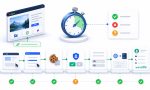
The values need to move from the landing URL into storage, from storage into hidden fields, from hidden fields into the final submission, and from the submission into the CRM.
Every step has to work.
If one piece fails, the final lead record looks blank and everyone starts blaming the wrong part of the system.
My advice is simple:
Debug the journey, not the symptom.
Find the exact place where the value disappears.
Fix that handoff.
Then test it like a real visitor before the campaign goes live.
That is how you keep multi-step forms from turning paid traffic into attribution guesswork.