
Cookie Consent Without Losing UTMs on WordPress
Most cookie consent articles talk like the only thing at stake is compliance.
That is not how I see it.
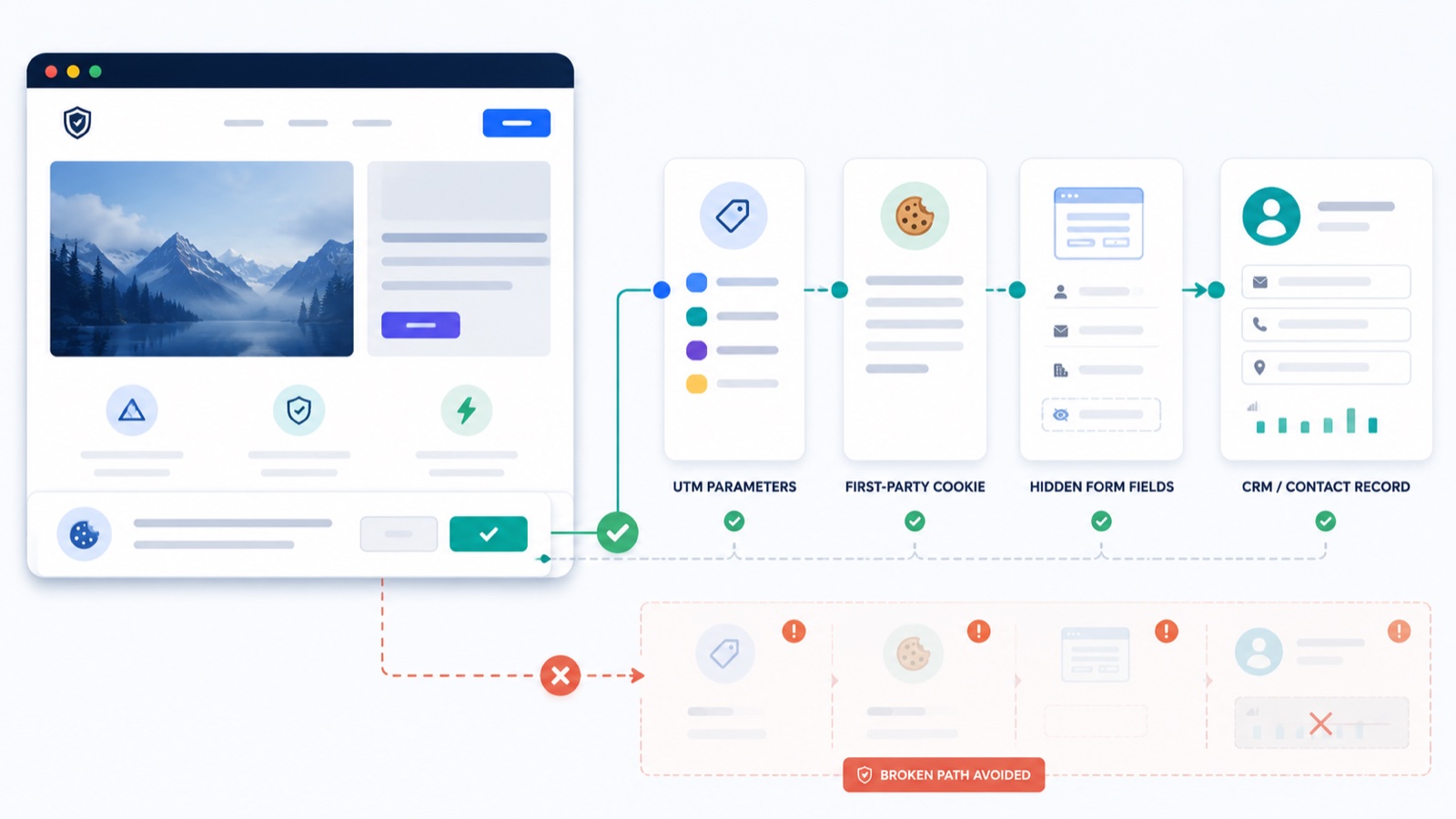
The real problem is that a badly implemented cookie banner can quietly wreck your attribution. Your forms still submit. Your ads still run. Your dashboards still look respectable. But the lead reaches your CRM with a blank utm_source, no campaign context, and no useful first-touch story attached to it.
That is the kind of failure I care about.
If you run WordPress and you use tools like Cookiebot, CookiePro, Cookie Notice, Cookie Information, or any other consent banner, the question is not just whether the banner appears. The question is whether your consent setup and your UTM tracking are actually talking to each other properly.
This is where most setups go sideways.
I have spent years dealing with WordPress attribution problems, support issues, and edge cases around HandL UTM Grabber. The pattern is consistent: people think they have a cookie problem, a GDPR problem, or a form problem. In reality, they usually have a handoff problem between consent and attribution.
This post is my practical take on how to handle that handoff without turning your setup into a mess.
One quick note before we go further: this is implementation guidance, not legal advice. I am talking about tracking reliability, consent-aware behavior, and WordPress workflows. Your lawyer can handle the legal interpretation. I am more interested in whether your stack behaves correctly in the real world.
The real tradeoff nobody should pretend away
Let me start with the uncomfortable part.
If you configure your tracking to wait for consent before storing marketing attribution, you will lose some data by design.
That is not a bug.
That is the point.
The current HandL docs are very clear about this. By default, the plugin collects UTM data regardless of consent status. If you choose to wait for consent, it will wait. And if the visitor never gives consent, that visitor's UTM data will not be tracked. The same warning appears in the direct integration docs for Cookiebot, CookiePro, and the newer WP Consent API guide.
That means your goal is not to magically keep 100% of attribution while also refusing to track non-consenting users.
Your goal is simpler:
- respect consent when you need to
- start tracking immediately once consent is given
- remove cookies when consent is denied or revoked
- avoid breaking attribution for the users who do consent
That is the real game.
What has to happen technically
If you strip away the vendor branding and compliance language, a solid consent-aware UTM setup on WordPress is not that complicated.
This is what I want to see:
- A visitor lands on the site with UTM parameters.
- If the site is configured to require consent first, those values are not stored yet.
- The consent banner fires a clear signal when the user accepts the relevant category, usually marketing.
- UTM tracking starts immediately after that signal, without forcing a page reload.
- If consent is denied or later revoked, the tracking cookies are removed.
The GDPR implementation guide for HandL UTM Grabber lays this out very plainly. The two core ideas are:
- start tracking when consent exists
- remove tracking cookies when consent does not exist
That guide also shows the real implementation logic behind it:
RunHandL()starts tracking when consent is grantedRemoveHandLCookies()removes HandL cookies when consent is denied
That may sound obvious, but many WordPress sites still fail here because the banner and the tracking plugin are both installed, yet nobody verifies whether those two events are actually connected.
Why this topic matters more now than it did a few years ago
A few years ago, plenty of marketers treated cookie consent as a banner problem.
That is no longer enough.
Google has been pushing consent-aware implementations for some time, and tools like Cookiebot, OneTrust, and Cookie Information all now have formal Google consent mode setup guidance. Google is also very explicit that consent mode is not a banner by itself. It is a signal layer that reacts to the choices your banner collects. See Google's overview of consent mode and its setup guides for Cookiebot, OneTrust, and Cookie Information.
There is also a broader reason this matters.
Microsoft Clarity began enforcing valid consent signals for traffic from the EEA, UK, and Switzerland on October 31, 2025. Microsoft also says Clarity can now honor Google Consent Mode signals. So this is not just a Google Analytics discussion anymore. Consent-aware behavior is becoming part of the normal operating environment for measurement.
In plain English: if your banner and your tracking setup do not work together, this problem keeps getting more expensive.
My take on the five main routes
Here is the practical version of how I think about the tools people keep asking me about.
| Option | My take | Best for | What to watch out for |
|---|---|---|---|
| Cookiebot | Solid CMP, mature ecosystem, direct HandL integration exists | Teams already using Cookiebot or needing a more established CMP | Make sure the consent-to-tracking handoff is verified, not assumed |
| CookiePro / OneTrust | Strong enterprise choice, but often heavier than many WordPress sites need | Larger teams, governance-heavy environments, enterprise stacks | Complexity, over-configuration, and too many moving parts |
| Cookie Notice | Simpler WordPress-first route | Small to mid-size WordPress sites that want a lighter banner | Do not expect enterprise CMP behavior from a simpler plugin |
| Cookie Information | Serious consent platform with Google setup support | Teams already inside that ecosystem | HandL's public docs here are thin, so test carefully |
| WP Consent API | My favorite general recommendation for most WordPress sites | WordPress users who want a cleaner, more future-friendly integration path | Use one consent path only, not multiple overlapping ones |
Now let me break those out.
1. Cookiebot
If you are already using Cookiebot, I would not rush to replace it.
The current HandL documentation includes a direct Cookiebot integration page, and the GDPR implementation guide shows a Cookiebot event listener approach as well.
The big upside is that the logic is straightforward:
- if you do nothing, HandL keeps tracking normally
- if you enable consent-aware behavior, HandL waits for consent
- once consent is granted, tracking can begin immediately without a page reload
That last part matters more than people realize.
If your banner requires a refresh before marketing attribution starts working, I already know I am looking at a weak implementation.
Cookiebot also has clear official material around WordPress installation and Google Consent Mode, which makes it easier to treat this as a real system rather than a floating popup.
My take: Cookiebot is a reasonable choice. I do not dislike it. I just do not think WordPress users should automatically assume they need it if a lighter route will do the job.
2. CookiePro, now part of OneTrust
CookiePro lives inside the broader OneTrust world now, and OneTrust is clearly positioning its consent tooling as a bigger consent-and-preferences platform rather than a simple cookie banner.
You can see that in OneTrust's current CookiePro transition page and its broader Consent & Preferences product positioning.
That tells me two things.
First, OneTrust is perfectly valid if you are in a more enterprise-heavy environment.
Second, many ordinary WordPress sites do not need that much machinery.
The HandL docs include a direct CookiePro integration page, and the behavior mirrors the Cookiebot logic in practical terms:
- default tracking continues unless you explicitly choose consent-aware behavior
- if you enable consent-aware behavior, HandL waits
- once consent is given, tracking can start immediately
My honest opinion is this:
If you already have OneTrust in place across the business, keep it and make it work properly.
If you are a lean WordPress business trying to solve one problem well, I would not introduce OneTrust just because it sounds enterprise-grade. "Enterprise-grade" often means "more ways to misconfigure things."
3. Cookie Notice
Cookie Notice sits in a different category for me.
I think of it as a WordPress-native consent route, not an enterprise consent governance platform.
That is not an insult.
In a lot of WordPress projects, simpler is better.
The interesting thing here is that HandL's public docs for Cookie Notice are currently very thin. The book exists, but it does not yet contain a real walkthrough. So if you are looking for a direct vendor-specific HandL tutorial, there is not much there right now.
I would also be careful with the name here. "Cookie Notice" is vague enough in the WordPress ecosystem that people sometimes assume all similarly named plugins behave the same way. They do not. Always confirm the exact plugin you are running and whether your chosen integration path is the direct one or the WP Consent API route.
That is exactly why I like the newer WP Consent API integration so much. It gives plugins like Cookie Notice a cleaner standard path instead of requiring a separate one-off integration page for everything.
My take: Cookie Notice can be a perfectly sensible choice for WordPress users who want a lighter setup. I just would not build the whole strategy around a missing vendor-specific HandL article when the standard API route is already there.
4. Cookie Information
Cookie Information is more serious than people sometimes assume from the name.
Google has an official Tag Manager setup guide for Cookie Information, and the WordPress plugin itself is positioned around banner management, consent mode, and marketing/analytics consent workflows.
That said, the current public HandL docs for Cookie Information are basically a placeholder right now, not a fleshed-out implementation guide.
So my practical answer is the same one I give for Cookie Notice:
If you are already using Cookie Information, I would not panic. I would just test the handoff very carefully and prefer the most standardized integration path available.
What I would not do is pretend that a stub documentation page gives me enough reason to recommend it over better-documented alternatives for a fresh setup.
5. WP Consent API
This is the one I would push most WordPress users toward.
The newer WP Consent API documentation is the cleanest consent story in the current HandL docs.
Why I like it:
- it is a standardized communication layer for WordPress consent plugins
- it reduces the need for separate custom integrations for every banner plugin
- the docs explicitly say it can work with plugins such as Cookie Notice, CookieYes, Complianz, Cookiebot, and others
- once enabled, tracking can begin immediately when consent is granted
- the docs also warn you not to enable both a direct integration and WP Consent API at the same time
That last point matters a lot.
If you already enabled Cookiebot or Complianz directly in the HandL GDPR settings, do not stack WP Consent API on top just because more boxes feel safer. More boxes do not mean more compliance. They often mean more ambiguity and more debugging.
My recommendation for most WordPress sites is simple:
Use one consent banner that supports WP Consent API, enable the WP Consent API path in HandL, test the flow properly, and stop there unless you have a very specific reason to do something more complex.
That is the most future-friendly route I see right now for ordinary WordPress implementations.
What I would recommend in the real world
If a founder, CEO, CMO, or operator asked me what to do tomorrow morning, I would not give them a giant taxonomy of privacy tooling.
I would say this:
If you already use Cookiebot
Keep Cookiebot.
Use the direct HandL integration if that is already how your setup is designed, or use WP Consent API if that is the cleaner path in your WordPress stack. Just do not enable both for the same purpose. Then test the consent event and the cookie behavior like a grown-up, not like someone checking a box and hoping.
If you already use OneTrust / CookiePro
Keep it if the organization truly needs it.
If you are on a bigger stack with privacy, governance, multiple domains, and multiple stakeholders, OneTrust makes more sense. Just accept that complexity is the tax you are paying.
If you are a normal WordPress site starting fresh
Use a banner plugin that works well with WP Consent API and keep the implementation simple.
That is my strongest recommendation.
I would rather have a boring, predictable, tested WordPress consent flow than a fancier consent platform that nobody on the team really understands.
If your main fear is "I will lose attribution"
Be honest about the tradeoff.
If you require consent before tracking, yes, some attribution disappears because some users will refuse consent.
That is normal.
The fix is not to bolt on a more complicated CMP and pray. The fix is to make sure consenting users are tracked immediately and correctly, and that your internal reporting understands what the loss actually represents.
The biggest implementation mistake I keep seeing
The most common mistake is assuming that a banner showing up means the consent system is working.
It does not.
A banner can appear beautifully and still fail at all the parts that matter:
- tracking starts too early
- tracking never starts after consent
- tracking only starts after a refresh
- cookies are never removed on denial
- multiple consent integrations conflict with each other
- the site team assumes Google Consent Mode solved everything by itself
That last one deserves extra attention.
Google Consent Mode is useful, but it does not replace the need for a proper banner, proper category mapping, and proper integration with the plugin that is actually storing attribution data. It is a consent signal framework, not magic dust.
How I would test the setup before trusting it
This part should be boring.
If it is not boring, it is probably not trustworthy.
The HandL GDPR implementation guide already gives the basic testing sequence, and I think every team should actually do it:
- Clear all cookies.
- Visit the landing page with UTM parameters and do not accept consent yet.
- Verify that HandL tracking does not start if consent is required.
- Accept the relevant consent category.
- Verify that tracking starts immediately and the cookies are set.
- Submit a test form and confirm the UTM values actually make it where they are supposed to go.
- Revoke consent.
- Verify that the HandL cookies are removed.
If Google tags are involved, I would also test the consent state in GTM preview or whatever equivalent workflow the team is using. Cookiebot, Google, and Microsoft all now have stronger guidance around consent-aware measurement than they did a few years ago. It is worth checking the signal flow, not just the UI.
And if you are piping data into forms or CRMs, I would test the whole path. Not just the cookie creation.
For example:
- if you use Contact Form 7 with HandL UTM Grabber, make sure the hidden fields are actually receiving values
- if you pass data downstream into CRMs or automation tools, verify the handoff there too
- if you are embedding external forms, double-check whether your workflow still depends on cookies being available at the time of submission
Too many teams stop testing one layer too early.
My blunt conclusion
I do not think most WordPress sites need a more sophisticated cookie banner.
I think they need a less confused implementation.
If your site already runs on Cookiebot or OneTrust, fine. Make it work correctly. If your organization genuinely needs enterprise privacy tooling, I am not here to argue with that.
But for the majority of WordPress operators, my recommendation is much simpler:
- choose one consent path
- use WP Consent API when possible
- avoid overlapping integrations
- accept the fact that no-consent users will not be attributed in the same way
- test the implementation end to end
That is how I would approach it if my goal were reliable attribution instead of compliance theater.
The reason I still like HandL UTM Grabber for this problem is the same reason I built it the way I did in the first place: I care about capturing the right information at the right moment and keeping it useful until conversion. That is why I have always leaned hard toward practical workflows like storing values in first-party cookies and passing them into real conversion paths such as forms, CRMs, and automations. If you want the broader background on that side of things, my older write-ups on capturing UTM and GCLID variables in WordPress and passing UTMs to ActiveCampaign are still useful.
Cookie consent does not have to kill attribution.
But it will if you treat the banner as the implementation.
The banner is just the front door.
The real work starts after the click.








[…] wrote more about this in Cookie Consent Without Losing UTMs on WordPress, but the short version is […]